How context length drives KV-cache memory, inference capacity and GPU cost.
Context length is usually treated as a model feature. For inference infrastructure, it is also a GPU memory requirement that increases with every active request.
Llama 3.1 accepts up to 128K tokens of context. 128K tells you how much context the model can handle. It doesn't tell you how much GPU memory or compute you'll need to handle a request that actually uses all 128K.
There are legitimate use cases where giving the model more information is useful. Retrieval, agents, code review and document analysis all work better when the model sees more relevant information at once. But holding all that context during inference requires GPU memory. The longer the context, the more memory the request can consume.
Each active request uses GPU memory to hold its context. So, the system keeps information about the tokens the model has already processed in a KV cache. As the request's context gets longer, the cache gets larger. The result is that a GPU can handle fewer simultaneous requests, and eventually you may need a different GPU setup.
Take Llama 3.1 70B, for instance. At 8K context, 32 concurrent requests need about 80 GiB of KV cache. At 32K, the same 32 requests will need about 320 GiB. The KV cache becomes roughly four times larger.
Context length affects not just what the model can process, but how many requests your infrastructure can serve at once.
While a request runs, the inference server keeps the attention keys and values for every token in its context. This formula estimates how much GPU memory is needed to store that K and V information for one token:
KV cache per token = 2 × layers × KV heads × head dimension × bytes
2 = one set of keys + one set of values
layers = the number of transformer layers in the model
KV heads = how many attention heads are used for the keys and values
head dimension = the size of each attention head
bytes = how much memory is used to store each number, depending on precision
For Llama 3.1, assuming the KV cache is stored in FP16, each token requires 128 KiB of KV-cache memory for the 8B model, 320 KiB for the 70B model and 504 KiB for the 405B model.
These per-token requirements add up as the context gets longer, so the cache grows linearly with context length. For one inference request being served by the Llama 3.1 70B model:

Concurrency multiplies the memory requirement because each active request needs its own KV cache. A single 70B request needs about 2.5 GiB of KV-cache memory at 8K context and 20 GiB at 64K. With 32 requests running at the same time, that becomes 80 GiB at 8K and 640 GiB at 64K. The model weights don't change at all. Only the amount of KV-cache memory needed to serve the active requests changes.
So far, we've looked at the relationship between model size, context length, and concurrency in terms of memory requirements. But what does that mean on an actual GPU? Take a single H200. Its fixed memory has to accommodate the model weights first, with whatever remains available for the KV cache. From there, context length and concurrency determine how many requests that GPU can actually serve.
Llama 3.1 70B in FP8 needs about 71 GB for weights. An H200 has 141 GB. With vLLM's default gpu_memory_utilization of 0.9,about 127 GB is available to vLLM, leaving roughly 56 GB (52 GiB) for the KV cache.
Memory available for KV cache = (GPU memory × 0.9) − model weights
Maximum concurrent requests = Memory available for KV cache ÷ KV cache required per request
Say you're running Llama 3.1 70B with an 8K context.
From our earlier calculation:
So:
52 ÷ 2.5 ≈ 20 requests
That means the GPU could theoretically hold the KV cache for about 20 concurrent 8K requests.
At 64K context:
So you're looking at about 2 concurrent requests at that context length, before accounting for the fact that actual serving capacity also depends on other factors.
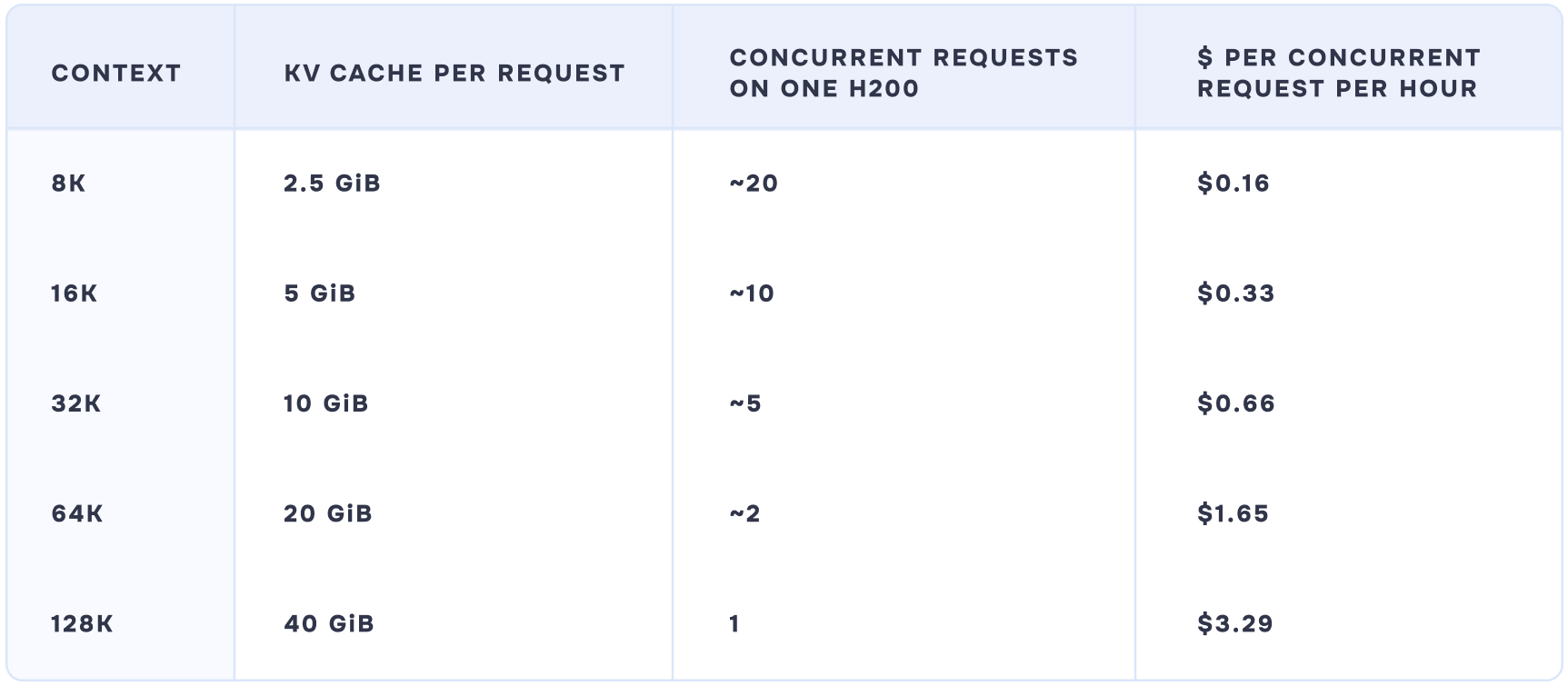
The H200 costs $3.29 an hour throughout the table. What changes is how many requests that $3.29 carries. At 8K it carries about twenty. At 128K it carries one.
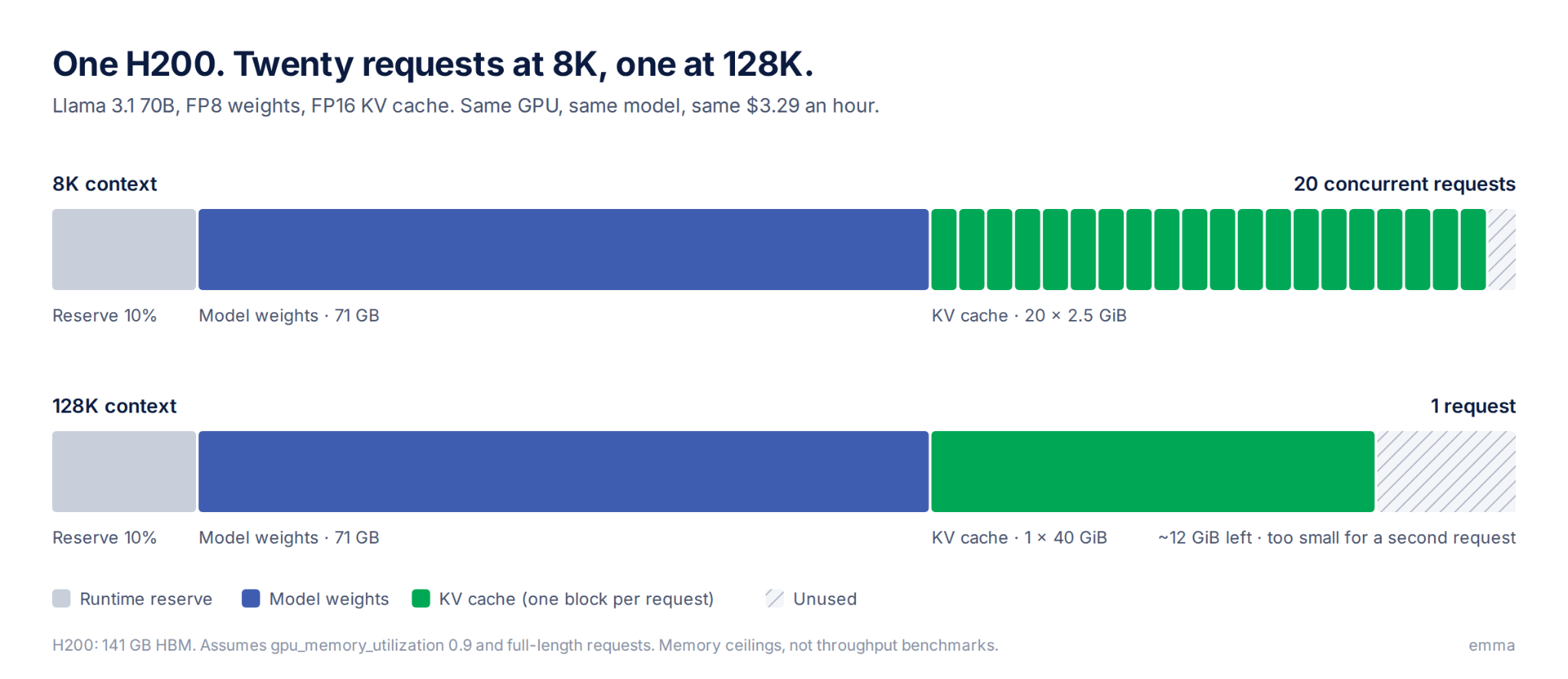
So concurrency falls as context length increases, because each request needs more KV-cache memory. But in production, it must work the other way: the team needs to serve a set number of users, and the GPU has to fit.
For example, if you need to process 20 concurrent requests on Llama 3.1 70B with FP8 weights:
Here's the cheapest configuration on emma's rate card for each context length:
Context
FP16 KV cache
FP8 KV cache
8K
1× H200 · $3.29/hr
1× H200 · $3.29/hr
16K
1× B300 · $6.10/hr
1× H200 · $3.29/hr
32K
4× H100 · $11.16/hr
1× B300 · $6.10/hr
64K
2× B300 · $12.20/hr
4× H100 · $11.16/hr
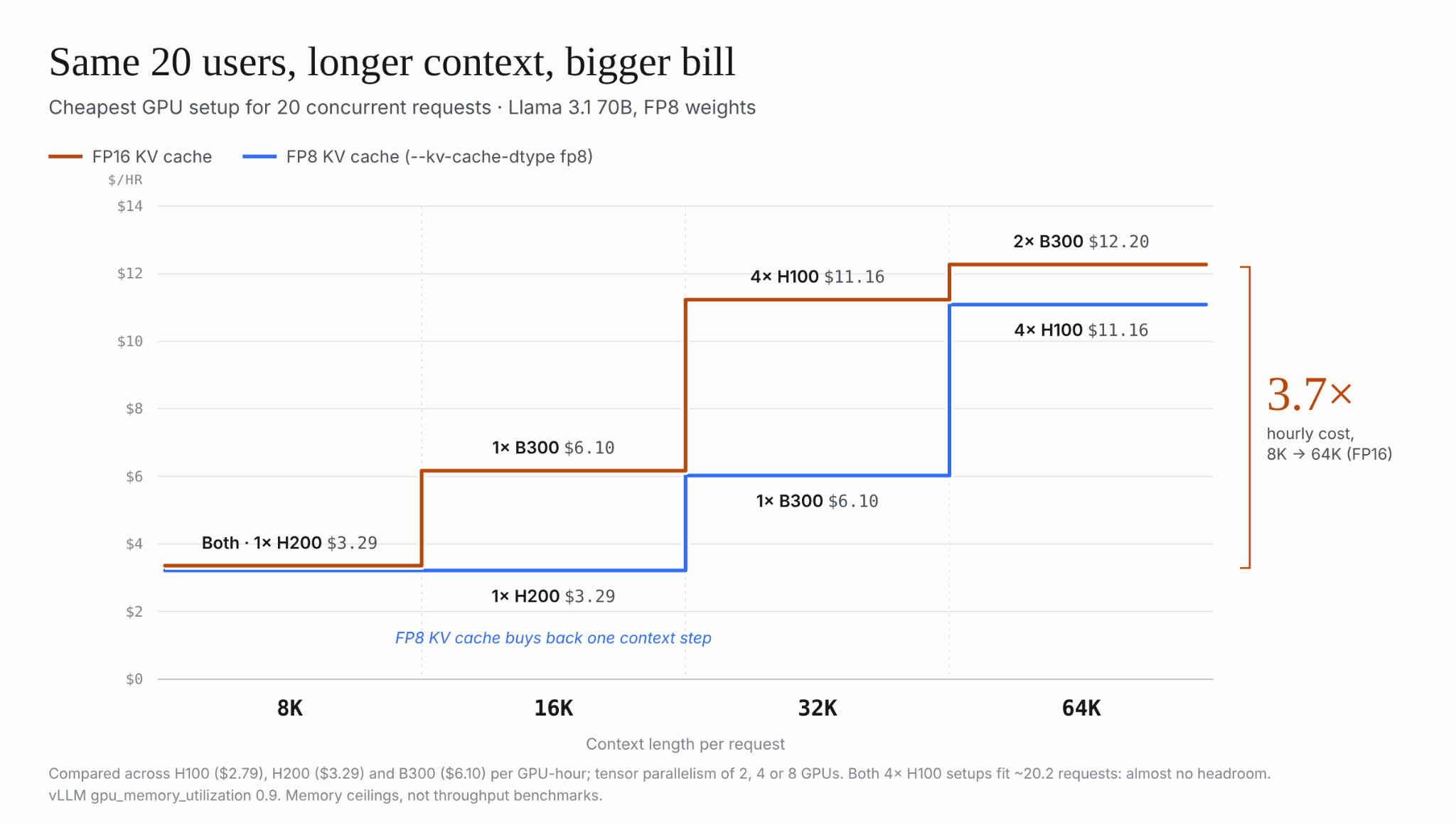
Moving from 8K to 64K takes the same workload from one $3.29 GPU to a $12.20 two-GPU setup. That's 3.7 times the hourly cost for the same model, the same users and the same weights. The difference comes from the additional GPU memory needed to hold the longer contexts.
Note that the tensor-parallel configurations in this example can only use 2, 4 or 8 GPUs because the model's attention heads must divide evenly across the GPUs. Second, some configurations only just meet the 20-request target, so 20 is almost the absolute limit. The 4× H100 setup at 32K, for example, has capacity for about 20.2 concurrent requests, leaving almost no headroom for additional demand or memory overhead.
Storing the KV cache in FP8 (vLLM's --kv-cache-dtype fp8) instead of FP16 reduces the memory required per cached value from 2 bytes to 1. That roughly halves the KV-cache memory required for a given context length.
The trade-off is precision. FP8 uses fewer bits to represent each value, which can reduce numerical precision and may affect model quality depending on the model, workload and implementation. The memory savings therefore come with a quality and compatibility trade-off, and whether to choose it or not depends on the model and your workload.
In long-context document summarization, for example, the reduction in precision may have an unnoticeable effect on the output. However, in workloads such as mathematical reasoning, code evaluation or classification near a decision boundary, small numerical changes can impact results. So, the choice should be validated against actual workloads rather than treated as a universally better setting.
Larger models start with more GPU memory occupied by weights. So, their weights leave less room for the KV cache. At 405B, for example, 32 concurrent requests at 64K context window need about 1,008 GiB of FP16 KV cache. This includes more than the roughly 810 GB for the model's FP16 weights alone.
The result is a compounding relationship. More GPU memory is consumed by weights, leaving less room for KV cache. So, the same increase in context or concurrency pushes a larger model to its GPU-memory limit sooner compared to a smaller model. Model choice therefore affects not just model quality and weight memory, but how much context and concurrency the deployment can support within a given GPU budget.
You can't size GPU infrastructure from the model's headline specifications alone. You need to know how the model will actually be used. A model might say 70B parameters, 128K maximum context, and supports FP16, FP8, etc. These capabilities don’t tell you what your production workload looks like.
For example, a model may support 128K context, but if your users normally send 8K requests, you don't need to provision for 128K. Conversely, if users can send 64K requests at peak, sizing for 8K will leave you short.
To plan capacity, you need to look at:
People often look at the model size and GPU memory first. But context length also directly changes the KV-cache requirement.
Capacity planning starts with the workload you need to serve. Define the peak context length, concurrent requests, weight and KV-cache precision, and the latency and throughput targets. Use those inputs to calculate the memory requirement and determine the GPU configuration. Then validate that configuration against the actual workload.
Increasing the context window changes the memory required by every active request. So, context length should be part of that calculation from the start.
Here’s what sizing this on emma looks like: Describe the model and workload in the AI Console and you get a plan with the GPU type and memory before anything launches. Rent from emma's fleet at the rates above, or launch in your own AWS, Google Cloud or Azure account so your existing credits and commitments still count.
.png)