Rag isn't one workload — it's two, with opposite needs and each wrong call adds to your gpu bill.
Three infrastructure complaints follow an internal knowledge bot into production almost on schedule:
"The GPU bill is $1,100 a month — for a bot people use nine to six, five days a week." "Answers have been getting slower every month, and we haven't changed the model." "It dropped mid-answer twice yesterday afternoon."
All three trace to provisioning decisions made in week one, usually by defaulting to how you'd host any other service: one instance, one capacity tier, always on. RAG punishes that default, because it isn't one workload — it's two, with opposite needs — and because its costs move with settings most teams don't think of as infrastructure settings at all.
Here's the sizing and placement logic, and what each wrong choice costs.
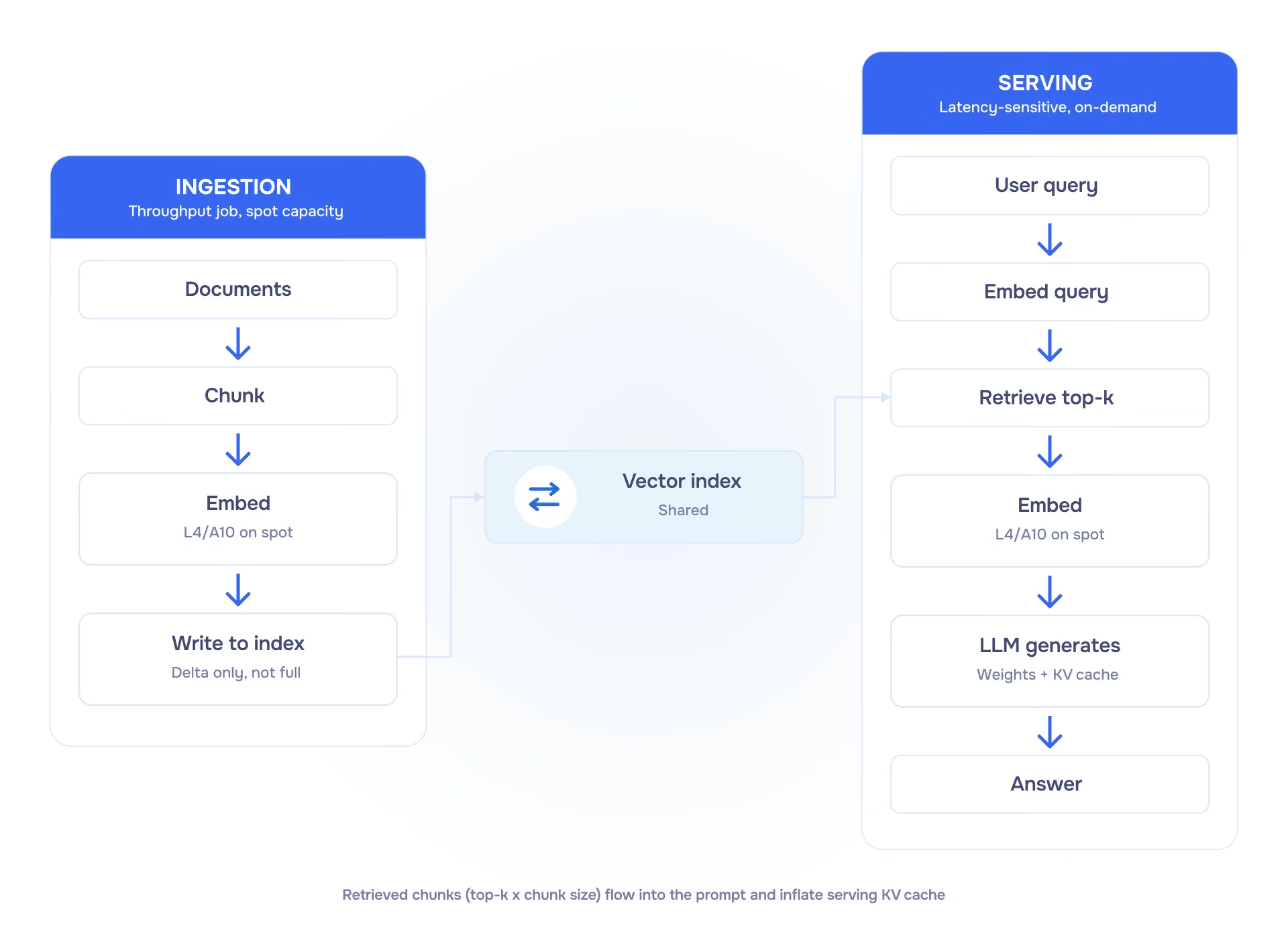
Ingestion turns your documents into something searchable: split content into chunks, compute an embedding vector for each chunk, and write the vectors to an index. It runs whenever your knowledge base changes — first as a full backfill, then incrementally as documents are added or updated.
Serving answers questions. It embeds the incoming query, retrieves the top-k most relevant chunks, optionally reranks them, builds a prompt from the query and retrieved context, calls the LLM, and returns the answer.
These two halves want very different things from your infrastructure.
Ingestion is a throughput job. No one is waiting on it, so it can be queued, checkpointed, interrupted, and resumed. That makes it a natural fit for spot capacity, which is typically 30–50% cheaper than on-demand GPU instances.
Serving is latency-sensitive. A user is waiting for a response in real time, so interruptions aren’t acceptable. It belongs on on-demand capacity.
Treating both halves the same is the most common RAG infrastructure mistake. Either your batch jobs run on expensive on-demand instances they don’t need, or your serving endpoint gets interrupted mid-response.
Embedding models are relatively small. Most production models range from a few hundred million to a few billion parameters, so this is not where you need high-end GPUs.
An L4 or A10 is usually more than enough for embedding workloads. For a large initial backfill, where total processing time matters, an A100 can finish faster — and on spot pricing, may not cost more overall.
In practice, two operational decisions matter more than the GPU itself.
Re-embedding the entire corpus on a schedule is a common — and expensive — mistake. Only process what has changed.
To make that work in practice:
If your pipeline can’t do incremental updates reliably, fixing that will save more money than upgrading GPUs.
Embedding costs per token are low. If your dataset is modest and your data policies allow it, a hosted API can remove this part of the infrastructure entirely.
A practical way to decide:
A hybrid approach is common: use hosted APIs early, then migrate ingestion in-house once scale or control justifies it.
The serving side follows familiar sizing logic: model weights (parameters × 2 bytes at FP16, ~0.5 bytes at INT4) plus KV cache per concurrent request. If that logic is new, the GPU workload placement guide covers it in full.
RAG introduces a twist that plain chatbots don’t: your retrieval settings directly increase memory usage.
The prompt isn’t just the user’s question — it’s the question plus everything you retrieved. A top-k of 8 with 500-token chunks adds ~4,000 tokens of context before generation even begins. KV cache scales with total context, so at the same concurrency, a RAG system can require significantly more memory than a chatbot using the same model.
Retrieval configuration is an infrastructure parameter, not just a quality parameter.
A practical way to think about it:
In practice, a small or quantized model with moderate retrieval settings runs comfortably on an L4 or L40S. As you increase model size, concurrency, or retrieval depth, you move into A100 or H100 territory.
The H200’s 141 GB becomes useful when you’re clearly VRAM-bound — long context windows, large batches, or both. This is common in mature RAG systems that gradually expand top-k and context length in search of better answers.
Also worth a line: the reranker. A cross-encoder reranking stage measurably improves answer quality and runs happily on the same L4 class as the embeddings. But give it its own capacity rather than co-locating it with the LLM endpoint, where it will compete for memory during traffic spikes.
A sizing guide should be honest about where the leverage is: retrieval quality beats model size. A 7B model fed the right chunks outperforms a 70B model fed the wrong ones, and the 7B runs on a card an order of magnitude cheaper.
Before scaling up your serving GPU, invest in the parts that actually improve answers:
Evaluation is what keeps this honest. Use a fixed set of real questions and track metrics like retrieval hit rate and groundedness so you can attribute improvements (or regressions) to specific changes.
The pattern is consistent: better retrieval improves quality more reliably than a bigger model. Treat GPU upgrades as the last lever, not the first.
Ingestion pipeline — chunking, embedding, index writes; delta-aware; runs on spot L4/A10 (A100 for large backfills).
The bottleneck here is usually data quality, not compute. Poor chunking quietly limits retrieval forever, so expect to iterate. Make the pipeline idempotent — retries will happen, and duplicate or corrupted entries degrade the index over time. Delta updates are non-negotiable: track changes at the document level and only re-embed what changed. Full re-indexing should be rare.
Vector index — a vector database (pgvector, Weaviate, Pinecone, or similar); often the operational bottleneck before the GPU is.
This is where systems slow down first. Latency degrades non-linearly with size and filter complexity, especially once you add access control. Approximate search needs tuning; defaults are rarely optimal. If retrieval latency exceeds LLM first-token latency, this is the layer to fix.
Serving endpoint — vLLM/TGI or similar on on-demand capacity; sized for weights + KV cache at your real retrieval settings and concurrency.
In practice, usable VRAM is lower than the spec sheet suggests, and concurrency hits limits before utilization does. Start with a few concurrent requests per GPU and tune using real prompts (with retrieval), not synthetic tests. Autoscaling helps, but cold starts and bursty traffic shape matter more than expected.
Reranker (optional but recommended) — small cross-encoder on its own L4-class capacity.
High impact on quality, but isolate it. Co-locating with the LLM works in dev and fails under load, where it competes for memory and introduces latency spikes.
Evaluation harness — fixed question set, groundedness and retrieval metrics, run on every index or model change.
Without this, every change looks like an improvement. A small, fixed set of real questions is enough to catch most regressions — which tend to come from retrieval, not the model.
Monitoring — GPU utilization, first-token and inter-token latency under load, retrieval latency, cost per answered query.
Focus on signals, not dashboards. Retrieval latency and context size explain most performance issues. Cost per answered query is the number that actually matters.
Cost
Track cost per answered query, not per GPU-hour. Serving workloads are spiky and often idle; below ~30% utilization, per-second or serverless billing is usually cheaper. Counterintuitively, a larger GPU can reduce total cost if it improves latency enough to increase utilization.
Freshness
Stale answers erode trust faster than slow ones. Wire ingestion to your source of truth and trigger updates on change, not on a schedule. If possible, expose “last updated” signals in responses.
Access control
Permissions must be enforced at query time, not just at indexing. This gets complex quickly (groups, inheritance, partial visibility), but skipping it turns the bot into a data-leak vector.
Fallback
When retrieval confidence is low, say so and point to sources. Letting the model improvise produces fluent but unreliable answers; a grounded fallback preserves trust.
Prompt injection via retrieved content
Anything in your index becomes instructions to the model — a support article, a pasted customer email, a scraped doc. Treat retrieved content as untrusted: delimit it clearly, instruct the model not to follow directives inside it, and never give the bot tools whose blast radius exceeds what a malicious document should be able to trigger. This belongs next to access control; they're the two halves of "the bot as attack surface."
Escalation path
The fallback section covers low retrieval confidence; this covers the user who's frustrated, the question that's out of scope, or the request that needs a human decision. Design the handoff to carry the conversation context with it — a bot that makes users repeat everything to an agent burns whatever trust it built.
Rollback and versioning
Version the index, the model, and the prompt together — a "model upgrade" that silently ships alongside a re-index is undiagnosable when quality drops. Keep the previous index warm enough to swap back. Your eval harness only helps if there's something cheap to revert to.
An internal knowledge bot has the least flattering traffic pattern in AI infrastructure: business hours, five days a week, spiky within the day. Run the division a dashboard won't run for you. A dedicated L40S-class instance at ~$1.50/hour is ~$1,100 a month. Users are active perhaps 45 of the week's 168 hours — under 30% before counting intra-day idle. Roughly $700–800 of that invoice buys an idle card, every month.
Below about 30% sustained utilization, per-second serverless GPU billing or scale-to-zero beats a dedicated instance — and an internal bot lives below that line more often than not. The number to track is cost per answered query: it's the one that exposes idle, and the one that tells you whether the system gets cheaper as adoption grows.
1. Split the placement
Move embedding jobs, re-indexing, and backfills to spot; keep inference serving on on-demand. It’s a configuration change, and usually the fastest cost win in a RAG stack.
2. Fix the serving layer
Run on a runtime with continuous batching and prefix caching (where your prompt structure allows reuse). Then test lower-precision inference (INT8/FP8 where supported) against your quality bar.
3. Add a semantic cache
Support traffic is highly repetitive. Cache responses for near-duplicate queries (embedding similarity or exact match) and bypass the LLM entirely. This can eliminate a meaningful share of GPU calls and is often a bigger win than model or hardware changes.
4. Measure cost per outcome
Take last month’s GPU spend and divide by requests served (or resolved queries), with utilization next to it. If you’re under ~20–40% utilization, price serverless before you price a bigger GPU.
For the same sizing logic across 12 AI workloads, see the GPU workload placement guide and the one-page cheat sheet.
.avif)
.png)