A platform leader's guide to running AI workloads on more than one cloud.
The fine-tuning job is ready, but the H100s aren't. The quota request comes back with a "not in this region", and that’s when the team starts wondering why can't they just run it somewhere else.
Theoretically, they can. But running workloads somewhere else means a second account, a second set of access policies, a second pipeline and a second bill somebody will have to reconcile with the first. So the team goes looking for that perfect tool that orchestrates GPUs across every cloud. Unfortunately, that tool doesn't exist. The search usually ends with a spreadsheet comparing features and capabilities that probably shouldn't have been in the same column in the first place.
What holds teams back from running workloads on another cloud isn't necessarily the workload itself. It's everything around multi-cloud adoption: whose account the GPUs sit in, which contract they're tied to, doing everything twice, the gaps and inconsistencies that inevitably creep in between clouds, and the operational burden that comes with all of it.
For most of the cloud’s history, the promise was that capacity was someone else's problem. That promise hasn't held for GPUs for a while, and the providers themselves are saying so.
Microsoft CFO Amy Hood told the Goldman Sachs Communacopia + Technology Conference that "very little can get built and come online in the next 12 months". The next day, at the same conference, NVIDIA CEO Jensen Huang said that all the Ampere-generation GPUs in the world were “all rented out.” He added: “You can still rent Voltas.” And Volta GPUs date back to 2017.
That evening, Oracle's Clay Magouyrk reported GPU utilization of 97.9% for the quarter, and said GPU capacity up for renewal was "renewed or resold at a 20% premium to prior contracts".
Today, GPUs two and three generations old still find renters, renewals cost more than the original contract, and very little new, non-reserved capacity can come online in the next year. If you rely on one cloud for GPUs, you're waiting in line with everyone else.
"Multi-cloud GPU orchestration" sounds like one problem. But it's really three problems stacked on top of each other, and each has its own tools that do it best.
.webp)
Capacity arbitrage happens at two moments. The first is the buying decision: which provider, which region, which GPU, at what price, and in whose account. That's where emma works. One catalog compares GPU availability and pricing across the hyperscalers, neoclouds, and emma's own fleet. It ranks the cheapest configuration per provider and location, and the capacity lands in an account you own.
The second moment is when a provider takes the capacity back. When a spot VM is reclaimed, emma keeps it stopped rather than deleted, leaves its persistent disks intact, and tries to restart the same instance once capacity returns. Although the human-in-the-loop can always make the decision to move work to a different provider altogether.
emma covers a good part of running the job too. Its managed Kubernetes can provision node pools on EKS, AKS and GKE with validated drivers and CUDA images, so there's no NVIDIA plugin to configure. emma runs the control plane, scheduler included, on upstream Kubernetes 1.29+ with no fork. Moving a workload to another provider means changing one label, not a re-architecture. One network policy layer and one cloud-agnostic storage class follow the workload across clouds.
Where emma stops, the specialist tools can easily take over. The scheduler emma runs is Kubernetes' own: it places pods, but it doesn't queue batch jobs. Kueue and Volcano add quotas, queueing and gang scheduling on top, and because they're plain Kubernetes controllers they work on any upstream cluster.
Run:ai and its open-source KAI Scheduler can split GPUs between teams with fractional GPUs and MIG, which isn't in emma's current release. Ray is a different kind of tool: it spreads training and serving across the nodes of whatever cluster you give it. What they don’t give you is one view of the cluster across clouds, and that comes with emma's Managed Kubernetes.
emma runs the monitoring alongside the control plane, so Prometheus, Grafana and PagerDuty use the same endpoints whichever cloud a pod runs on. GPU utilization, VRAM, power and temperature show up in the cluster's monitoring tab, with no agents or DCGM exporters to install. Metrics and traces can flow on to Grafana, Prometheus, Datadog, New Relic or any OTLP collector, and the full Kubernetes audit log exports to your SIEM.
The third job is equally important. Teams need to keep tabs on who changed what, what it cost, and how to stand up the same environment on a second provider without rewriting it. Instead, each cloud usually comes with its own way of handling this, so teams end up working across separate consoles and dashboards and reconciling the numbers by hand.
.webp)
Storage and data movement add two more considerations. Storage layers like MinIO and WEKA keep data accessible at the throughput GPUs need, while network egress costs determine whether moving datasets and checkpoints between clouds is economically viable. They're essential to a workable multi-cloud setup, but they solve data access and movement instead of workload scheduling or infrastructure orchestration. That’s why, for this information brief, we treat them as supporting considerations rather than separate layers of GPU orchestration.
It's one thing to find capacity on another cloud, but being able to use it without giving up the advantages you've negotiated with your primary provider is the actual challenge.
Kubernetes and containers have made the technical side of portability considerably easier. A pinned image with a pinned CUDA version can run across EKS, GKE and AKS. But the dependencies that make switching difficult haven't disappeared. They've moved up the stack, into contracts and cloud accounts.
Take commitments, for instance. AWS lets you book GPU Capacity Blocks up to eight weeks ahead. Google Cloud committed-use discounts and Azure reservations run for one or three years. The discounts are real money, and they're also how you secure capacity even in a period of shortage. Jassy made this clear when he said the capacity AWS is adding for 2027 "is largely reserved". Whoever signed early is first in line.
Reservations are a fair trade if you size them to predictable demand. Basically, you should commit only to the floor of your demand, the GPU-hours you're certain you'll use every month. When demand exceeds that floor, run it on spot, on-demand or a neocloud contract. This strategy makes sure that a re-architecture or a better price elsewhere doesn't strand the commitment.
[Related reading: A closer look at the economics of cloud commitments and cost optimisation: Why You Can't Cut the Cloud Bill in Half.]
Then there's the question of whose account the capacity runs in. Some GPU platforms provision infrastructure through their own cloud accounts and resell access to it. Others let you connect your existing AWS, Azure or Google Cloud accounts and provision directly into them. When capacity sits in a platform's account, the underlying reservations, discounts and provider relationship belong to that platform. With your own account, you retain control of those commitments, your negotiated rates and the option to move to another platform without rebuilding your provider relationship.
Operational lock-in is less visible, but just as capable of making a second cloud impractical. Teams that duplicate Terraform modules, access policies and deployment pipelines for every provider end up maintaining separate environments rather than one portable infrastructure setup. Keeping workloads portable requires consistency across a few areas:
This is where a common operating layer can make a difference. emma's Managed Kubernetes provisions GPU node pools across EKS, AKS and GKE with validated NVIDIA drivers and CUDA images, reducing the work involved in preparing consistent GPU environments across providers. Teams can manage those environments through the same interface, with shared monitoring, cost visibility and governance across their infrastructure. That doesn't eliminate the need to make workloads, data and checkpoints portable, but it removes some of the operational duplication that makes adding another provider difficult.
GPU maturity isn't a count of clouds. It's about how well prepared you are to operate across them. Adding a second provider before jobs can checkpoint and resume, or before capacity commitments are properly sized, creates more operational work than it solves.
.webp)
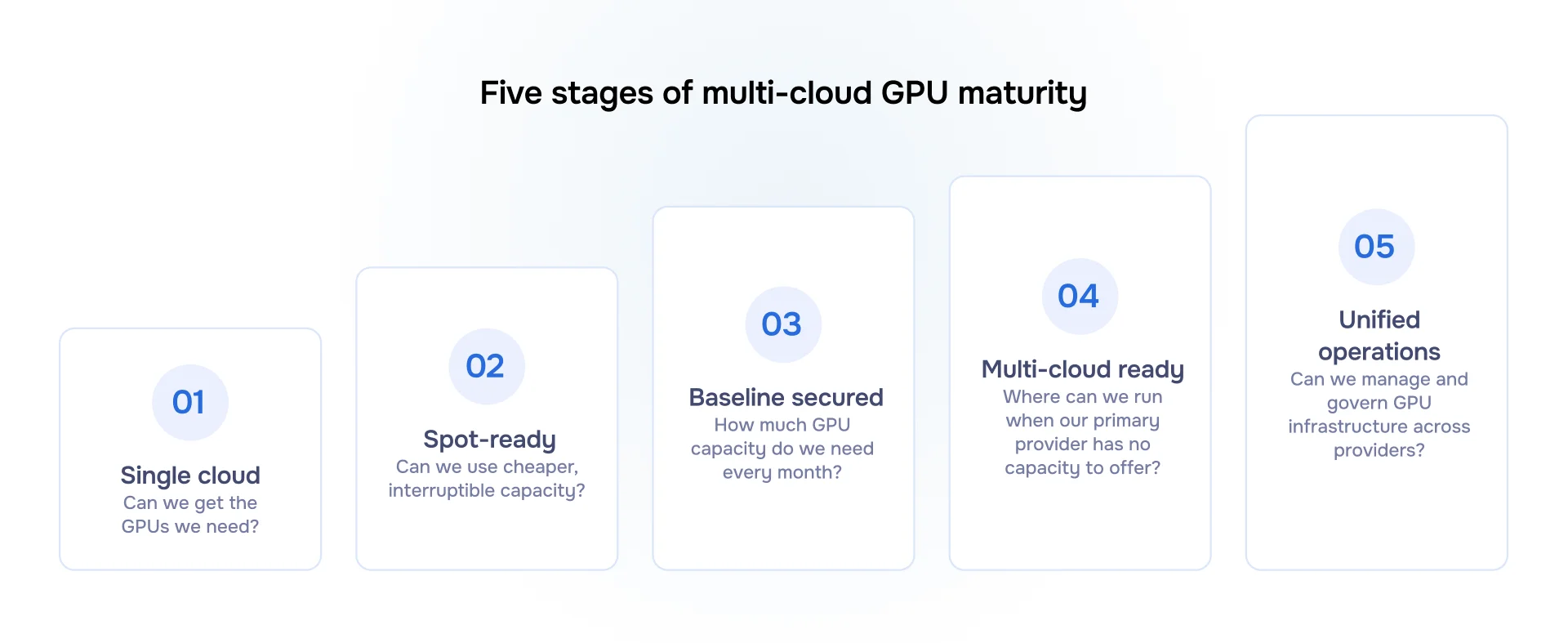
Not every team needs to reach the final stage. If you run a handful of GPUs a few times a week, a second provider costs more in engineering time than it saves. Spot with good checkpointing and a reservation for the baseline may be all you need. The upper stages pay off when quota denials repeat, GPU usage stays heavy week after week, procurement leverage is an explicit goal, and the team already runs Kubernetes comfortably. Even then, adding providers doesn't mean spreading every workload across them. Latency-sensitive inference may be better served by keeping workloads close to their data and users.
emma is a cloud operations platform for distributed infrastructure. In GPU terms, it does the most work in getting capacity and running the estate.
Getting capacity. emma's GPU catalog compares instance types, availability and pricing across AWS, Google Cloud, Azure, neoclouds, and emma's own fleet, which includes GPUs from L40 to H200, B200 and B300. Spot search identifies the cheapest available configuration by provider and location. Teams can provision into their own cloud accounts, with the provider billing them directly at their negotiated rates; use capacity operated by emma without holding a cloud account themselves; or combine both.
Running the job. emma's Managed Kubernetes provisions GPU node pools across EKS, AKS and GKE, with validated NVIDIA drivers and CUDA images. Teams can use the same operating interface across providers rather than configuring each environment independently. Node groups can run entirely on spot capacity, with an on-demand minimum that teams set themselves. This provides a consistent Kubernetes environment, but it doesn't handle every part of workload scheduling. Kubernetes' built-in scheduler places pods; it doesn't queue batch jobs. Kueue and Volcano add queueing and gang scheduling, while Run and KAI Scheduler provide GPU sharing through fractional allocation and MIG.
Running the estate. emma brings infrastructure monitoring, cost visibility and change control into one operating layer. GPU utilization, VRAM, power and temperature appear alongside CPU and network metrics without requiring teams to install exporters. GPU spend can be broken down by team, project and provider. In the AI Console, infrastructure changes generate a plan with a cost preview, and a person must approve execution. The audit log records who changed what, while metrics and traces can be sent to Grafana, Prometheus, Datadog, New Relic or any OTLP collector.
An exit you can see. Everything emma builds is real infrastructure in your own accounts, read directly from the providers rather than a private state file. If you decide to leave emma at any point, you can export your infrastructure configuration as standard Terraform, YAML or JSON and take it with you.
If you track one number this quarter, make it the time from GPU request to running job, measured by provider. Price per GPU-hour tells you what you paid. Time to first GPU tells you how long you waited to get it. In 2026, access to capacity can be just as important as its price, and no hyperscaler can guarantee that capacity will be available when you need it.
Also track what you pay per GPU-hour with each provider and how much of your GPU capacity goes unused. Together, these metrics help you decide where to source capacity, how to distribute workloads and when a second provider makes financial and operational sense.
This brief was put together by the team at emma. If a second set of eyes on your GPU setup would help, whether it's understanding where your capacity sits, how it's distributed or what commitments you're carrying, we're happy to have that conversation.
.avif)
.png)